
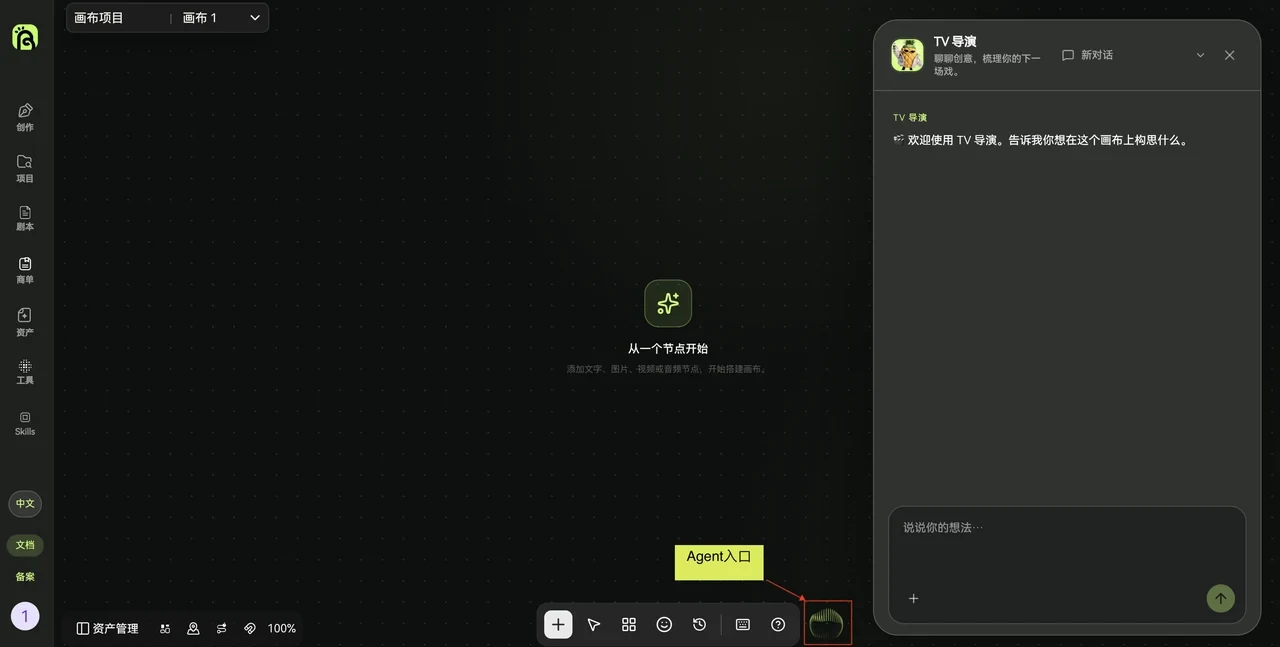
The panel on the right of the canvas is the most fundamental difference between canvas mode and the other two modes.
It isn’t a chatbot. It’s a collaborator that can read and write your canvas, create nodes and submit generation tasks. Your job is learning how to direct it.
1. What it understands
The official examples say it well:
- “Create a character image of a historical-style heroine.”
- “Connect this character and the street scene from earlier to the video generation node.”
- “Generate three different shots from this text.”
- “Use this image as the first frame and generate a five-second video.”
- “Group the three video clips on the canvas together.”
Five sentences covering five kinds of operation: creating content, establishing relationships, batch generation, specifying references, tidying the canvas.
Notice that every sentence carries context — “the street scene from earlier”, “this image”, “this text”. The Agent resolves those references by reading the canvas, so what’s on the canvas determines whether it can understand you.
2. The full collaboration flow
The built-in flow has eight steps:
- Enter your creative request in the Agent panel on the right
- The Agent reads the current canvas and the relevant nodes
- It creates or modifies text, image, video and audio nodes per the request
- It searches for and adds suitable style, effect or reference material
- It asks for your confirmation before generating, modifying the canvas or creating assets
- After you confirm, the system submits the generation task
- When the task finishes, the result is materialized automatically as a new canvas node
- The Agent continues with the next step based on the result, or waits for your next revision request
Step 7 is critical: results become nodes automatically. You don’t drag generation results onto the canvas by hand; they’re already there, ready to connect to the next stage.
3. What needs confirmation and what doesn’t
This rule lets you predict the Agent’s behavior:
| Operation | Confirmation needed |
|---|---|
| Reading the canvas, viewing nodes, searching material | No |
| Creating nodes, modifying content, adding references | Yes |
| Submitting generation tasks (which consume compute) | Yes |
The logic is clear: operations that don’t change the canvas and don’t cost anything just happen; operations that change the canvas or cost money ask you first.
So you’ll see the Agent rip through a stack of nodes one moment and stop to wait for a confirmation click the next. It isn’t stuck; that’s the design.
4. Three boundaries
- The Agent won’t bypass project permissions, material permissions or compute deduction rules. Anything it can do, you can do too; anything you can’t do, it can’t do for you.
- All generation results belong to the current project. Whatever it produces stays in this canvas / project, where you can keep editing, referencing and generating.
- It won’t make the call for you. Which style to pick, which take to keep — that judgment stays with you.
5. How to talk so it understands
5.1 Use referents, not abstractions
- Bad:
Generate another one - Good:
Using the heroine image from earlier as reference, generate a 5-second video of her walking in the rain at night
5.2 One thing at a time
The Agent can handle compound instructions, but splitting them gives you more control. Especially for operations that consume compute, confirm one at a time — easier to trace when something goes wrong.
5.3 Name the reference
With three character images on the canvas, “this one” tells it nothing. Use the node name or a clear description: “the one in red.”
5.4 State your criteria
- Bad:
This looks bad, redo it - Good:
The face is too flat; increase the light-shadow contrast, keep the hair and outfit
6. Typical scenario: from one sentence to one video
A complete Agent collaboration example:
- “Create a character image of a historical-style heroine” → a character image node appears
- “Now generate a rainy-night old street scene” → a scene image node appears
- “Connect these two to the video generation node” → connections are made; character and scene become references
- “Generate a 5-second shot from this connection, she turns her head slowly in the rain” → task submitted (confirmation required)
- “That looks good, group this clip on its own” → canvas tidied
Five steps and you have a usable shot. Not once did you touch a generation parameter by hand.
7. What the Agent isn’t good for
- Tasks that need precise parameter control: when the model, duration and resolution must be exact, clicking the panel yourself is more reliable
- Standardized batch production: for a dozen-plus storyboard frames per episode, the storyboard page in script mode is far more efficient
- Deliverables that need strict version control: the canvas is an exploration space, not a delivery pipeline
The canvas Agent is an accelerator for the exploration stage, not a volume production tool. Once you accept that, it gets a lot easier to use.
8. Next steps
To learn how the 3D scene node on the canvas works, see Director Stage Basics: 3D Scenes, Base Bodies and Camera Positions.