
3 people, 3 days, 121 episodes, and on launch day it hit No. 4 on the new-release chart.
These numbers come from Bollo.Video’s Script Mode: you drop in a script, and the built-in Agent breaks out characters, scenes, props, storyboards, and prompts layer by layer. People only review.
The team that used it is one of our partners. On the day this drama went live, it shot to No. 4 on Douyin’s short-drama new-release chart — with 7.974 million heat.

The three spots above it sat at 7.975 million, 7.974 million, and 7.974 million — four numbers almost stacked on top of each other. This wasn’t “sneaking onto the chart.” It slammed straight into the first tier.
The line going around the internet — “AI makes videos fast” — only gets the surface right.
What’s actually worth unpacking is how this 3-person team ran 121 episodes to the finish: who did what, which steps were handed to the machine, and which ones still needed a person to call.
01 / What you’re missing isn’t AI. It’s a production line
It’s 2026. The last thing AI short-drama teams lack is tools.
For generating video: Seedance, Kling, Vidu — take your pick. Scripts get written with large models. Image edits go to Nano Banana, GPT Image 2.5, Seedream 5.0. Each one is strong on its own.
What breaks is never the tools. It’s the seam between them.
The script lives in a document. Character looks are scattered in a folder called “references.” Prompts sit in some ace’s chat history. Generated clips pile up in the Downloads folder.
What stitches all of this together? A person. Usually the most senior person on the team.
A human middleware.
Models get stronger generation after generation, but that seam still has to be filled by people. The harder you work the seam, the lower your production ceiling.
Which leaves three pains you can’t get around:
Pain 1: Breaking things down is still manual labor. A script of a hundred-plus episodes has to become an asset table and a storyboard table you can actually execute. That means pasting a stretch to the AI, then pasting a stretch back. The smarter the model, the more glaring this copy-paste becomes.
Pain 2: Writing lives on a person. For the same shot, the number of rerolls between an ace’s prompt and a newcomer’s can differ by several times. Prompts are the team’s most expensive body of experience — and they live in someone’s head. When that person leaves, the experience leaves with them.
Pain 3: Consistency depends on memory. Cross-episode character consistency rests on “don’t forget to attach the reference this time” and “don’t drop a line when you copy the description.” By episode 80, nobody can keep discipline by memory alone.
So today’s content teams don’t lack models. They lack a production line that strings the models together.
That’s what Script Mode in Bollo.Video does: it replaces that “human middleware” with an Agent.
02 / The three most experience-heavy steps are now handled by three Agents
Getting started is almost counterintuitively simple: upload a script (TXT / PDF / DOCX / DOC) and create a project — Script Mode is the default.
But from the moment you hit “Create,” you are no longer operating software. Three things start running on their own.
① Breaking out assets: from “a setting in someone’s head” to “an object in the project”
Once the script is in, the Agent reads the whole book, then pulls out every “entity” in the drama on three layers — characters → scenes → props — and drops them into the asset library as cards.

What does this step actually change?
Before, “what the female lead looks like” lived in someone’s memory, plus a few reference images in a folder. Every generation meant describing her again, pasting images again, and praying again. 🙏
Now she is a project-level object: she comes with a look, with a voice (the voice library can be filtered by language, gender, and age, or you can upload your own), and you can batch-generate different angles. All 121 episodes share the same definition.
Change the look once, and it applies across the whole drama.
Consistency stops being a discipline problem and becomes a reference problem. Discipline depends on people. References depend on the system.
That’s the confidence that lets you start 121 episodes.
② Breaking out storyboards: from “writing” boards to “reviewing” them
The 121 episodes are automatically spread into a structured storyboard table — by episode, by scene, by shot.
Every storyboard card comes with a shot description, the characters who appear, the scene they’re in, and the props that are used. On the left, an episode track lines up all 121 episodes vertically, so you can see at a glance where you are.
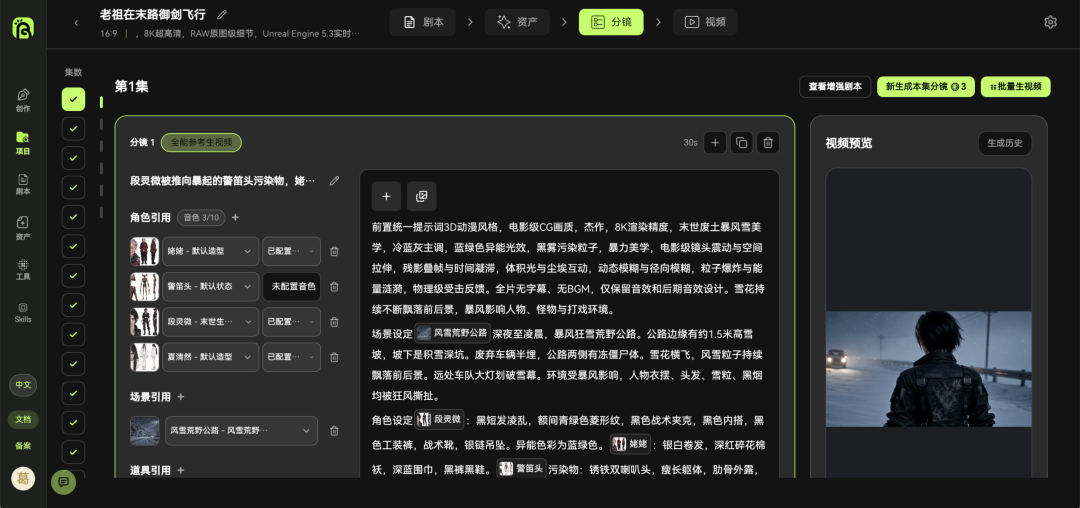
Then you notice your role in this step has changed — from “writing” to “reviewing”: which shot should be added, which should be cut, which line of emotion is off.
The director’s attention is given back to judging the storyboard, instead of writing it.
The finished storyboard list can be exported as a PDF. That’s the interface for a traditional crew: directors, producers, and clients still like paper. What the AI broke out can be printed and taken into a meeting.
③ Writing prompts: from “a personal trick” to “the system default”
Open any storyboard, and the prompt is already written.
The Agent folds the shot description, appearing characters, scene, props, and motion requirements into an instruction that can go straight to the video model, then pins the assets in with @: @female-lead, @ruined-temple.
What the model sees is not “a man in period costume.” It’s “still that same person.”
If you want to change it, change a few words. If you don’t, pick a model — Seedance 2.0, Seedance 2.5, and Minimax H3 are right there in the panel — set a duration, and generate.
The real point of this step is that the team’s most expensive, most scarce capability becomes the default:
The prompt a newcomer writes on day one is already the best the team has historically written.
There’s no more single point of failure called “only he can write prompts,” and no more midnight chat logs of @-ing the ace for a rescue. Reroll counts come down not because of luck, but because of default quality.
These three things — breaking out assets, breaking out storyboards, writing prompts — share a hidden premise: they all require “understanding the whole drama” first.
Loose tools can’t do that. However strong the model is, if you paste it three scenes at a time, it can only understand three scenes.
Only when the script lives in the system does the Agent have a global view.
And the three Agents pass the baton: assets that were broken out go into the storyboard, storyboard descriptions go into the prompt, and the prompt carries asset references into generation. Zero hauling in the middle.
So the difference between “Script Mode” and “a pile of AI tools” fits in one sentence: one sells capability, the other sells a production line.
03 / 121 episodes don’t fall apart because of two pieces of infrastructure
First: assets are live.
They don’t live in a chat history, or on someone’s computer. They are the shared base draft for the whole project. Change a look, swap a voice, and it applies across the drama.
What’s more aggressive is reuse across projects: in the asset library you can see which projects have called each character. A look that’s been polished in one drama can be used directly in the next.
The team’s assets snowball. They aren’t burned after one use.
Second: review and delivery are also online.
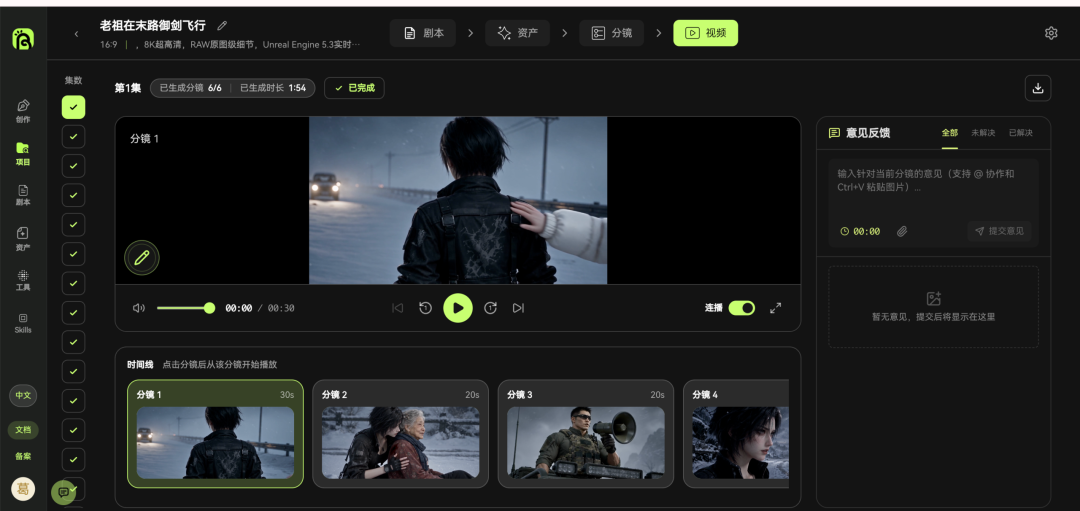
Storyboard video, dubbing, and subtitles sit as three modules over a single timeline — align, tweak, export. All 121 episodes support batch download — you don’t have to click 121 times.
On the final-cut page you can leave a comment directly: “Episode 87, 2 minutes 14 seconds, not up to standard.” Locate it to the second, and assign it to a person.
04 / How 3 people finished 121 episodes
Most AI teams still collaborate with three things: a WeChat group, a shared drive, and a spreadsheet for the books.
It can run, but it doesn’t run fast, and the bigger it gets, the messier it gets.
Bollo’s approach is to put the project, the assets, the credits, and the output all in the same space.
Division of labor: a minimal setup
For 121 episodes, the most natural split is by episode: about 40 episodes each, each person owning a stretch.
Three people, in the same project, looking at the same script, the same set of assets, and the same progress bar.
The asset library has four layers: public assets (the platform’s material marketplace), team assets (shared within the group), personal assets (a scratch box), and my favorites. The person working on episode 87 doesn’t have to ask a colleague for the lead’s look; someone who joins midstream can open the project and pick up where things left off.
The reason this split works comes down to one sentence: the three people are not talking to each other through files. They’re talking through assets.
So the division of labor is simplified to the extreme: you don’t have to split by role, only by episode count as territory.
The script is the same object, the character is the same card, the storyboard is the same table — there is no “I’ll send you a version after I finish my edits,” and therefore no version fights.
Of course, that’s only one way. Some people split by “script polish, asset confirmation, episode-by-episode push,” or let the person who writes prompts best take on the hard shots. It’s the same project; you can cut it however you want.
Shared, but accounted for
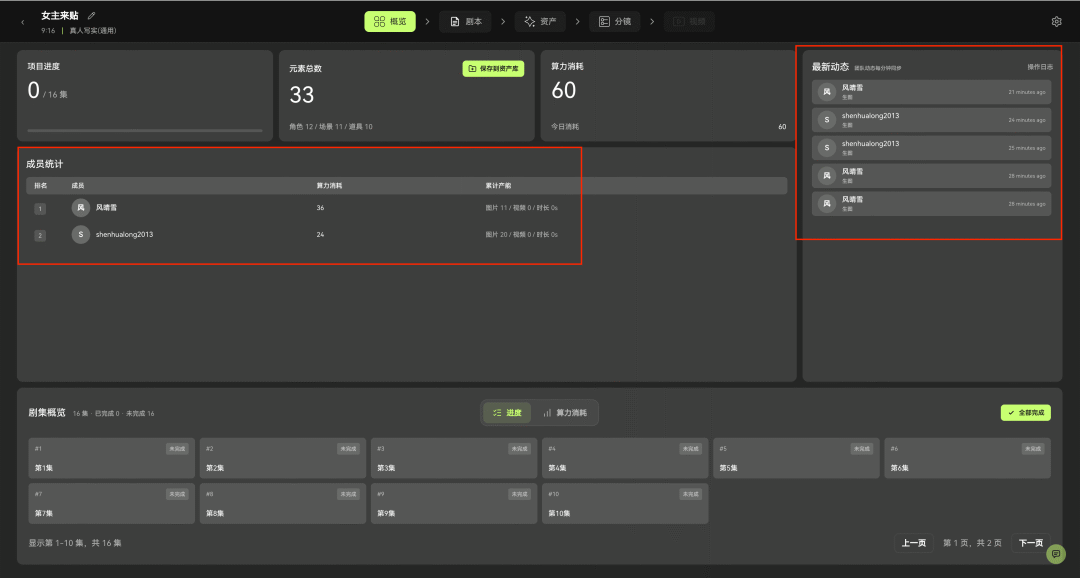
The team shares credits and benefits, but each person’s generation records belong to them independently. In the member stats on the project overview, who used how much compute and how much output they’ve accumulated is listed line by line.
Team management also has three trend metrics: credit consumption (cost waterline), generation duration (net render time), and reroll count (production-line stability).
Personally, I like “reroll count” the most. It doesn’t ask how many clips you produced. It only asks how many times you retried.
When the reroll count suddenly spikes, it means the prompt or the asset has a problem — not that someone got lazy.
Cost: you can set a cap in advance
Compute is allocated: an admin assigns a quota per member, for example 10,000 credits at a time, equivalent to about 1,000 yuan of compute. The ability to set a credit cap per episode is also on the way, so “how much this episode can cost at most” goes from a verbal agreement to a number in the system.
For a 121-episode project, you can work out the total bill before you start, instead of finding out how much you spent only after wrapping.
People moving in and out is also light: one invite link opens an account, and deleting it closes it. The roster can change, the project does not — script, assets, storyboards, and final cuts are all still there.
For a production contractor, this solves the old nightmare: someone leaves, and the materials are scattered across several people’s computers.
05 / Hitting the chart is the real point
If it were only “121 episodes finished in 3 days,” that would be an extreme challenge.
What actually makes this stand is what happened after it went live: No. 4 on Douyin’s short-drama new-release chart, 7.974 million heat.
The chart only recognizes one thing: whether the audience wants to keep watching.
So the conclusion is not “AI can finish a drama.” It’s this:
When a drama’s production cycle is compressed to 3 days, you have the right to make it, ship it, and be seen while the trend is still hot.
Script Mode pulls production capacity up. The team space compresses the cycle. What’s left — whether the story is good, whether the characters stand, whether the hook is sharp enough — is still the creator’s craft.
AI is responsible for only one thing: making sure your judgment gets seen in time.
If you happen to have a script in hand
No need to change the format, no need to split episodes first. Just drag it into Bollo.Video — create a project, and Script Mode is the default. Then go pour yourself a coffee. ☕
When you come back, a row of “people” will be standing in the asset library: your lead, your antagonist, that ruined temple you wrote, all already consistent, voices included.
Click one layer down, and your episodes have already been spread into a storyboard table, with each shot’s prompt sitting there waiting for you to review.
You don’t have to know how to do any of this first. If the script knows, it knows.
One person can be a dream factory. Three people can be a production line.
That script in your hands deserves a production line.
Bollo.Video — try it now!